Here we will insert data in MySQL using JSP Servlet and JDBC.
Here We will fetch Data from the JSP page and pass it to Servlet then DAO which contains JDBC code to store data in the MySQL database.
How To Get Data From Database To Servlet Jdbc JSP
Technology used
- apache-tomcat-10.1.1
- JavaSE-17
- eclipse IDE for Enterprise Java and Web Developers
Steps for Data insertion using Jsp Servlet
- Create MySql Table
- Create a Dynamic Web Project
- Create package structure
- Create Java files
- Create JSP Pages
1 Create MySql Table
create table student(
  id bigint(20) unsigned NOT NULL AUTO_INCREMENT,
  roll_no bigint(20),
  name varchar(100),
  course varchar(100),
  session varchar(80),
  semester varchar(80),
  mobile_no varchar(30),
  email_id varchar(100),
  address varchar(200),
  add_date timestamp DEFAULT CURRENT_TIMESTAMP,
  primary key(id),
  unique key(roll_no),
  unique key(mobile_no),
  unique key(email_id)
) ENGINE = InnoDB DEFAULT CHARSET = utf8;
Creating Java Dynamic Web Project
Open Eclipse IDE and follow the below steps
- Click on File->New-> Dynamic Web Project.
- Give project Name
- Select Target runtime (here apache-tomcat-10.1.1)
- then next again next then finish.
create package structure for storing servlet, model, and DAO.
Project Explorer
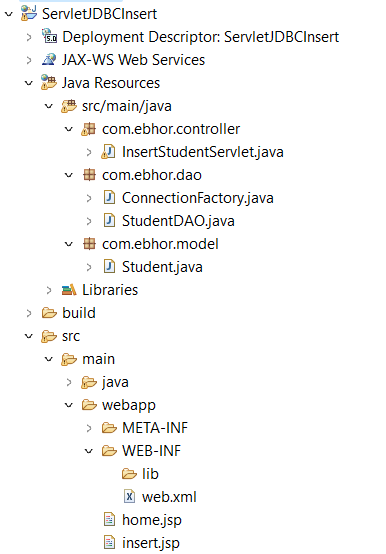
External Jar
The following External jars are included in the apache tomcat lib folder
mysql-connector-java-8.0.30
JSP Page to insert student record -insert.jsp
<%@ page language="java" contentType="text/html; charset=ISO-8859-1" pageEncoding="utf-8"%> <%@taglib uri="http://java.sun.com/jsp/jstl/core" prefix="c"%>Insert Student ${failure}Add Student
Servlet class to get Student Data from JSP- InsertStudentServlet.java
This servlet accepts data from JSP using a request object and getParameter() and store all data in student object.
Student object is passed to StudentDAO insert() to save data in MySQL database.
If data is inserted then the request response is forwarded to home.jsp.
In case of error, it is again sent back to insert.jsp.
package com.ebhor.controller;

import java.io.IOException;
import java.util.List;

import com.ebhor.dao.StudentDAO;
import com.ebhor.model.Student;

import jakarta.servlet.RequestDispatcher;
import jakarta.servlet.ServletException;
import jakarta.servlet.annotation.WebServlet;
import jakarta.servlet.http.HttpServlet;
import jakarta.servlet.http.HttpServletRequest;
import jakarta.servlet.http.HttpServletResponse;

@WebServlet("/insert-student")
public class InsertStudentServlet extends HttpServlet {
	private static final long serialVersionUID = 1L;
	StudentDAO dao = new StudentDAO();

	protected void doPost(HttpServletRequest request, HttpServletResponse response)
			throws ServletException, IOException {
		Student student = new Student();
		student.setRollNo(Long.parseLong(request.getParameter("rollNo")));
		student.setName(request.getParameter("name"));
		student.setCourse(request.getParameter("course"));
		student.setSession(request.getParameter("session"));
		student.setSemester(request.getParameter("semester"));
		student.setMobileNo(request.getParameter("mobileNo"));
		student.setMailId(request.getParameter("email"));
		student.setAddress(request.getParameter("address"));
		int i = dao.insert(student);
		if (i == 1) {
			request.setAttribute("success", "Student record inserted successfully");
			RequestDispatcher rd = request.getRequestDispatcher("/home.jsp");
			rd.forward(request, response);
		} else {
			request.setAttribute("failure", "Student record can not be inserted");
			RequestDispatcher rd = request.getRequestDispatcher("/insert.jsp");
			rd.forward(request, response);
		}

	}
}
DAO class for JDBC connection and record insertion
ConnectionFactory.java
This class returns the connection object.
package com.ebhor.dao;

import java.sql.Connection;
import java.sql.DriverManager;
import java.sql.SQLException;

public class ConnectionFactory {

 public static Connection getConnection() {
 Connection c = null;
 try {
 Class.forName("com.mysql.cj.jdbc.Driver");
 c = DriverManager.getConnection("jdbc:mysql://localhost:3306/ebhor","root", "");
 } catch (ClassNotFoundException e) {
 System.out.println("ClassNotFoundException " + e);
 } catch (SQLException e) {
 System.out.println("SQLException " + e);
 }
 return c;
 }
}
StudentDAO.java
This class contains the logic of data insertion to the database. JDBC Prepared statement is used to save data in Database.
package com.ebhor.dao;

import java.sql.Connection;
import java.sql.PreparedStatement;
import java.sql.ResultSet;
import java.sql.SQLException;

import com.ebhor.model.Student;

public class StudentDAO {
	Connection con = null;
	PreparedStatement ps = null;
	ResultSet rs = null;
	int st = 0;

	public int insert(Student student) {
		con = ConnectionFactory.getConnection();
		try {
			String query = "insert into student(roll_no,name,course,session,semester,mobile_no,email_id,address) "
					+ "values(?,?,?,?,?,?,?,?)";
			ps = con.prepareStatement(query);
			ps.setLong(1, student.getRollNo());
			ps.setString(2, student.getName());
			ps.setString(3, student.getCourse());
			ps.setString(4, student.getSession());
			ps.setString(5, student.getSession());
			ps.setString(6, student.getMobileNo());
			ps.setString(7, student.getMailId());
			ps.setString(8, student.getAddress());
			st = ps.executeUpdate();
			System.out.println("value of i=" + st);
		} catch (Exception e) {
			st = -2;
			e.printStackTrace();
		} finally {
			try {
				con.close();
			} catch (SQLException ex) {
				ex.printStackTrace();
			}
		}
		return st;
	}
}
Student Model class Student.java
JSp Page on successful insertion – Home.jsp


Student Home


	${success}


Result


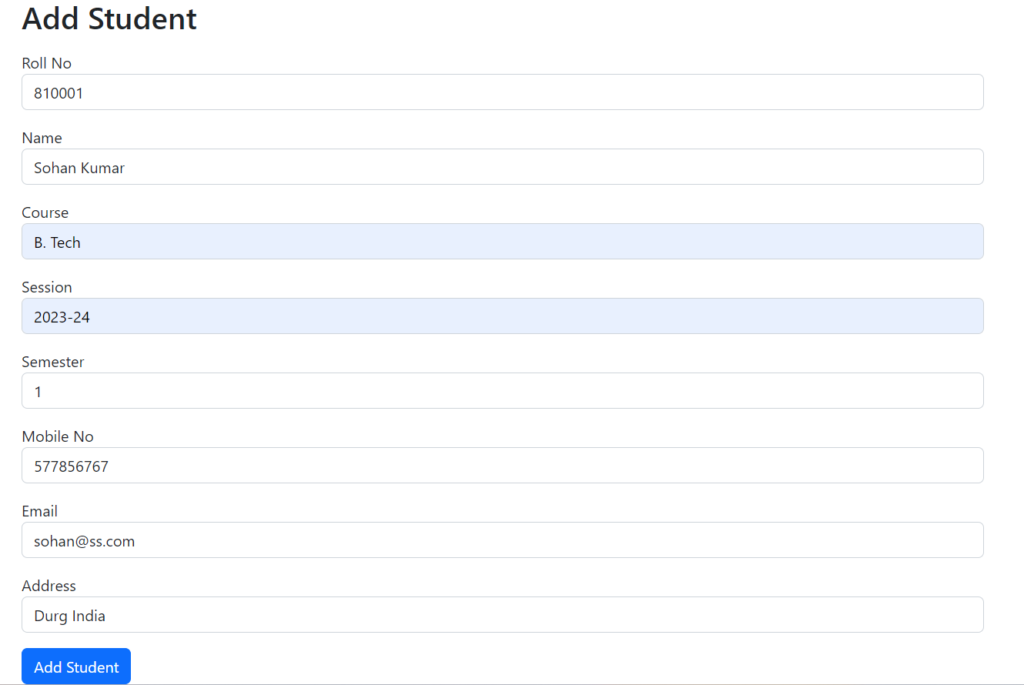
insert.jsp


This page contains all fields of students.


This will pass to InsertStudentServlet.java. that passes the student model to StudentDAO that saves data to the database.


home.jsp


On successful insertion, it will be redirected to the home page and shows the following message.


Here we discussed How to insert data in MySql Using JSP Servlet & JDBC