
Creating Login page in awt applet is easy.
Here we are not using any layout.
Login page contains two label, one textfield , one password field and two buttons.
Steps by step process to develop this program is as below
- Declare Label, JTextField, JPasswordField and Button
- Inside init() create object for JLabel, JTextField and JPasswordField and Button
- setBounds() to show elements in specific position.
- set Container layout to null
setLayout(null); - add all elements to container using
add() - set size of container
setSize(400, 300); addActionListener()to login and reset button- override
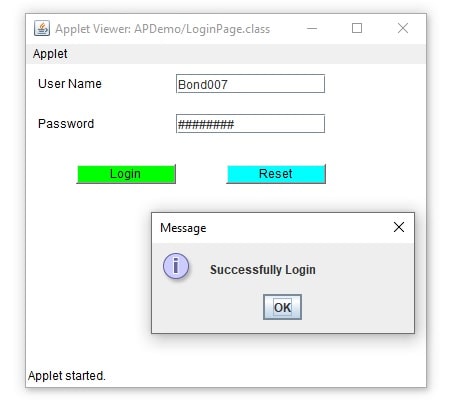
actionPerformed()for login and reset - on click on login button if username is Bond007 and password in James007 then show message Dialog Successfully Login
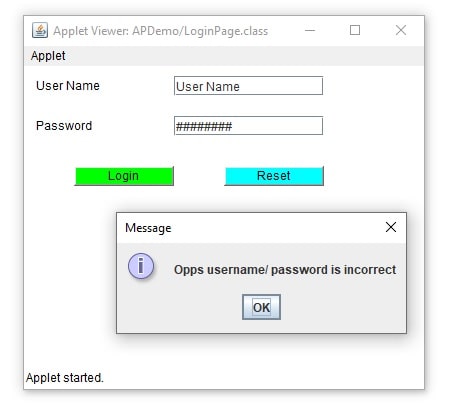
- if username and password is incorrect then show message Dialog Opps username/ password is incorrect
- on click on reset button reset the values of username and password field
Login page in awt applet Example
package APDemo;
import java.applet.Applet;
import java.awt.Button;
import java.awt.Color;
import java.awt.Label;
import java.awt.event.ActionEvent;
import java.awt.event.ActionListener;
import javax.swing.JOptionPane;
import javax.swing.JPasswordField;
import javax.swing.JTextField;

public class LoginPage extends Applet {

    Label userNameLabel, passwordLabel;
    JTextField userName;
    JPasswordField password;

    public void init() {

        userNameLabel = new Label("User Name");
        userName = new JTextField(20);
        userName.setText("User Name");
        passwordLabel = new Label("Password");
        password = new JPasswordField(20);
        password.setText("Password");
        password.setEchoChar('#');
        login = new Button("Login");
        reset = new Button("Reset");
        userNameLabel.setBounds(10, 10, 100, 20);
        userName.setBounds(150, 10, 150, 20);
        passwordLabel.setBounds(10, 50, 100, 20);
        password.setBounds(150, 50, 150, 20);
        login.setBounds(50, 100, 100, 20);
        login.setBackground(Color.GREEN);
        reset.setBounds(200, 100, 100, 20);
        reset.setBackground(Color.CYAN);
        //set applet layout to null
        setLayout(null);
        //add elements to applet
        add(userNameLabel);
        add(userName);
        add(passwordLabel);
        add(password);
        add(login);
        add(reset);

        //set size of applet
        setSize(400, 300);

        //login button click
        login.addActionListener(new ActionListener() {

            @Override
            public void actionPerformed(ActionEvent ae) {
                String uname = userName.getText().toString();
                String passwd = password.getText().toString();
                System.out.println("User Name :" + uname);
                System.out.println("Password :" + passwd);
                if (uname.equals("Bond007") && passwd.equals("James007")) {
                    JOptionPane.showMessageDialog(null, "Successfully Login");
                } else {
                    JOptionPane.showMessageDialog(null, "Opps username/ password is incorrect");
                }

            }
        });
        //reset button click
        reset.addActionListener(new ActionListener() {

            @Override
            public void actionPerformed(ActionEvent ae) {
                userName.setText("");
                password.setText("");

            }
        });

    }
}
Elements are placed in specific position using setBound().
Buttons click events are bind using ActionListener and handled by actionPerformed.
We handled events like below.
login.addActionListener(new ActionListener() {

            @Override
            public void actionPerformed(ActionEvent ae) {
             }
}
You can handle actionPerformed() separately for that you have to implement ActionListener in your class.
You can run and check Program output
Hope you Got this.
Read More
Login form in Java Swing and MySql Database with source code
Registration Form in Java Swing with MySql Database
JTable in Java Swing with Examples
JTable Pagination in Java JDBC and MySQL Database