
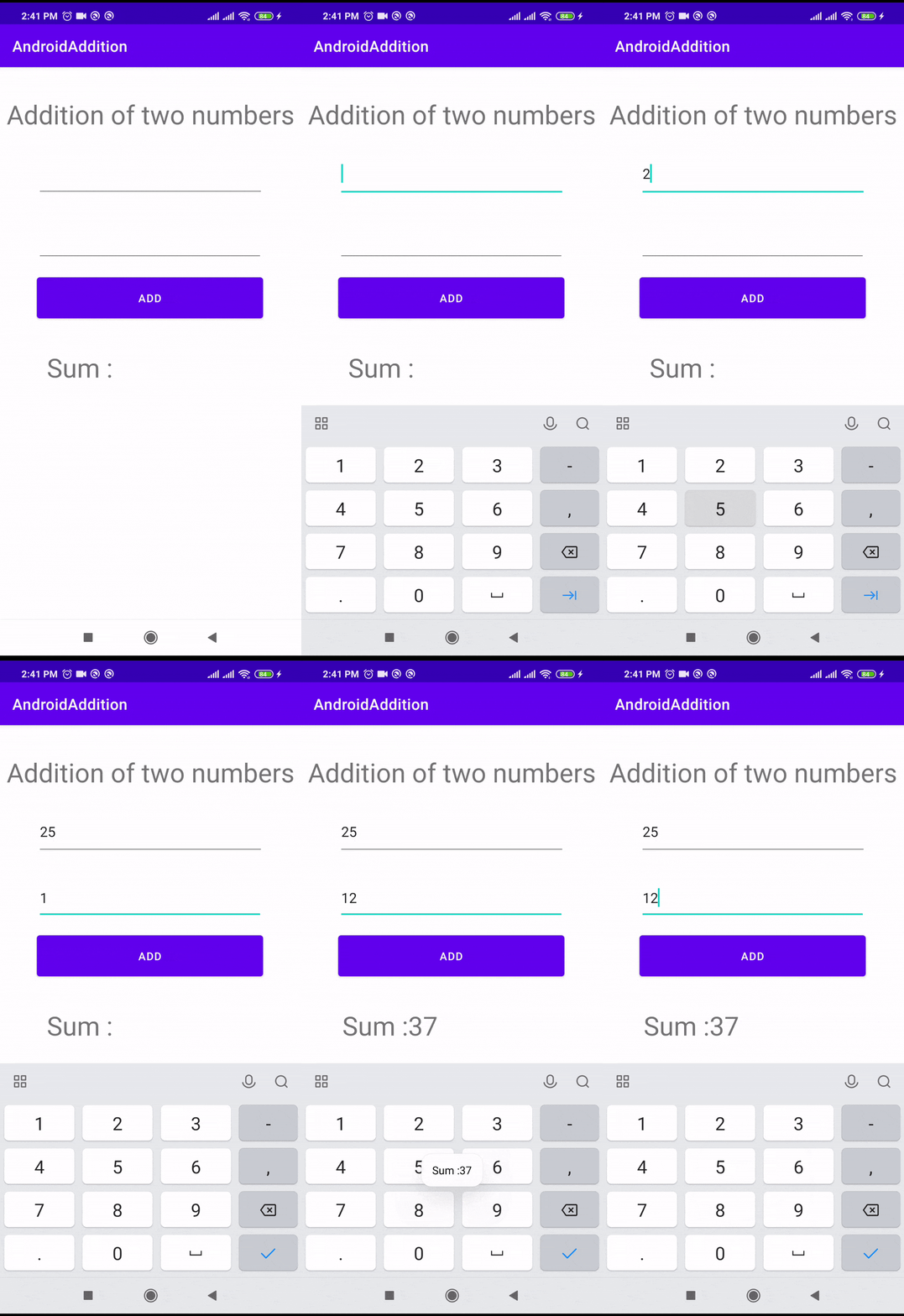
This is a basic program for Addition of two numbers in Android
Steps to add two numbers
- Create a new Android project in Android Studio.
- Open the activity_main.xml file and add two EditText or NumberText views for the user to input the numbers and a Button view for the user to initiate the addition process.
- In the MainActivity.java file, declare the two EditText views and the Button view as class-level variables.
- In the onCreate() method of the MainActivity.java file, initialize the EditText views and the Button view by finding them by their respective IDs.
- Set an OnClickListener on the Button view to listen for when the user clicks it.
- In the onClick() method of the OnClickListener, get the text from the EditText views, convert them to integers, add them together, and display the result in a Toast message or in a TextView on the screen.
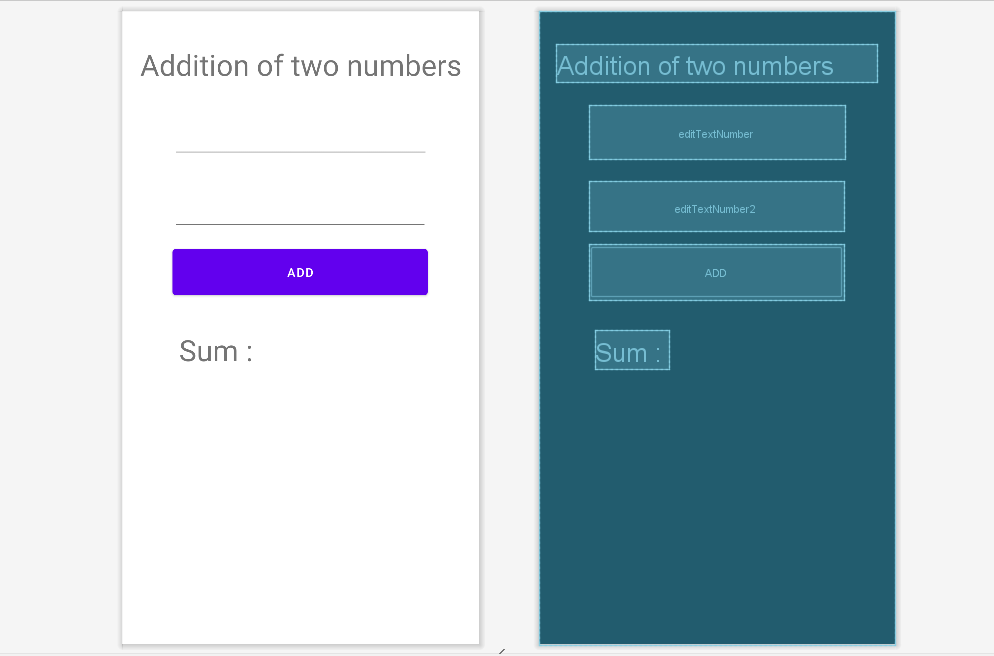
Activity_main.xml
MainActivity.java
package com.ebhor.addition;

import androidx.appcompat.app.AppCompatActivity;

import android.os.Bundle;
import android.view.View;
import android.widget.Button;
import android.widget.EditText;
import android.widget.TextView;
import android.widget.Toast;


public class MainActivity extends AppCompatActivity {
    EditText number1;
    EditText number2;
    TextView result;

    @Override
    protected void onCreate(Bundle savedInstanceState) {
        super.onCreate(savedInstanceState);
        setContentView(R.layout.activity_main);
        number1 = (EditText) findViewById(R.id.editTextNumber);
        number2 = (EditText) findViewById(R.id.editTextNumber2);
        result = (TextView) findViewById(R.id.textView2);
        Button add = (Button) findViewById(R.id.button);
        add.setOnClickListener(new View.OnClickListener() {
            public void onClick(View v) {

                int num1 = Integer.parseInt(number1.getText().toString());
                int num2 = Integer.parseInt(number2.getText().toString());
                int sum = num1 + num2;
                result.setText("Sum :" + sum);
                Toast.makeText(MainActivity.this, "Sum :"+sum, Toast.LENGTH_SHORT).show();
            }
        });
    }

}
- It defines an Android activity called
MainActivity. - In the
onCreatemethod, it sets the content view to the layout defined inR.layout.activity_main. - It initializes three UI elements:
- It initializes a
Buttoncalledaddand sets anOnClickListenerfor it. - When the “add” button is clicked, it does the following:
To validate we will use the Saripaar library.
Add this library to the build.gradle in the dependencies section as below
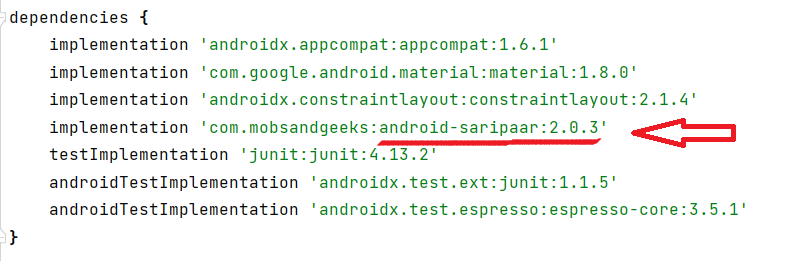
To use Saripaar in the program
- Implement the Interface
Validator.ValidationListener - Override two methods
public void onValidationSucceeded()andpublic void onValidationFailed(List errors)
Overridden implementation is given below.
package com.ebhor.addition;

import androidx.appcompat.app.AppCompatActivity;
import android.app.Activity;
import android.os.Bundle;
import android.view.View;
import android.widget.Button;
import android.widget.EditText;
import android.widget.TextView;
import android.widget.Toast;

import com.mobsandgeeks.saripaar.ValidationError;
import com.mobsandgeeks.saripaar.Validator;
import com.mobsandgeeks.saripaar.annotation.NotEmpty;

import java.util.List;


public class MainActivity extends Activity implements Validator.ValidationListener {
    @NotEmpty(message = "Please Enter number1")
    EditText number1;
    @NotEmpty(message = "Please Enter number2")
    EditText number2;
    TextView result;
    Validator validator;

    @Override
    protected void onCreate(Bundle savedInstanceState) {
        super.onCreate(savedInstanceState);
        setContentView(R.layout.activity_main);
        number1 = (EditText) findViewById(R.id.editTextNumber);
        number2 = (EditText) findViewById(R.id.editTextNumber2);
        result = (TextView) findViewById(R.id.textView2);
        Button add = (Button) findViewById(R.id.button);
        validator = new Validator(this);
        validator.setValidationListener(this);

        add.setOnClickListener(new View.OnClickListener() {
            public void onClick(View v) {
                validator.validate();
            }
        });
    }

    public void addNumbers() {
        int num1 = Integer.parseInt(number1.getText().toString());
        int num2 = Integer.parseInt(number2.getText().toString());
        int sum = num1 + num2;
        result.setText("Sum :" + sum);
        Toast.makeText(MainActivity.this, "Sum :" + sum, Toast.LENGTH_SHORT).show();
    }

    @Override
    public void onValidationSucceeded() {
        addNumbers();
    }

    @Override
    public void onValidationFailed(List errors) {
        for (ValidationError error : errors) {
            View view = error.getView();
            String message = error.getCollatedErrorMessage(this);

            // Display error messages ;)
            if (view instanceof EditText) {
                ((EditText) view).setError(message);
            } else {
                Toast.makeText(this, message, Toast.LENGTH_LONG).show();
            }
        }
    }

}
Hope you learn Addition of two numbers in Android.