
In Modern web applications, We get data from the server in JSON format and display data in JSP or HTML page using Front end library or frameworks like Angular, React, etc.
This is similar to mobile app development.
Here we will see how we can get JSON Response from the servlet and show it in JSP.
What is JSON?
JavaScript Object Notation (JSON) is a lightweight format for interchange data.
- JSON is a Good Human readable format
- JSON is derived from JavaScript
- JSON is a text-based format for representing structured data
- JSON is key value pair data
- JSON is language independent
These are features of JSON.
JSON can be used to interchange data between different platforms.
Due to its lightweight, it is very fast to exchange information between different applications i.e. web-based applications.
So knowing how to use JSON with servlet will good
Creating Java web project in NetBeans
We already know how to create simple projects with NetBeans see project creating with maven and creating simple web projects in Netbeans.
We created a Java Web project ServletJson to get Response from Servlet JSON
Project Explorer
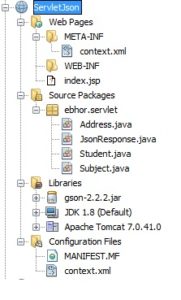
In above project
- Created Pojo for Studnet
- Created Pojo for Address
- Created Pojo for Subject
- Created JsonResponse Servlet
- created index.jsp
Creating Classes and Pages In Netbeans
index.jsp
This file contains a link on click that will goto URL
localhost:8084/ServletJson/jsonResponse
<%@page contentType=”text/html” pageEncoding=”UTF-8″%>
Get Json response from server
JsonResponse.java
Here we want to send JSON data response from the servlet.
Here a link is available on the JSP page on the link click it is calling /jsonResponse URL where JsonResponse’s doGet() method is get called.
How to set HttpServletResponse set body JSON
To generate JSON response we are setting response.setContentType(“application/json”); that is used to set the response as application/json.
Here the response is the reference variable of HttpServletResponse.
In the servlet student object is created with the name gender mobile number and three subject marks. After creating the object we are converting objects to JSON using Gson library.
response.setContentType("application/json"); is used to send responses as JSON.
response.setCharacterEncoding("utf-8"); is a character encoding method.
We have created a student object which contains student’s id, name,gender, address, mobileNo, and set of subjects and address.
We send this data to jsp using Gson Object.
The method gson.toJson(student); is converting an object to JSON string
then we are passing JSON data to PrintWriter object to write in browser
package ebhor.servlet;

import com.google.gson.Gson;
import java.io.IOException;
import java.io.PrintWriter;
import java.util.HashSet;
import java.util.Set;
import javax.servlet.ServletException;
import javax.servlet.annotation.WebServlet;
import javax.servlet.http.HttpServlet;
import javax.servlet.http.HttpServletRequest;
import javax.servlet.http.HttpServletResponse;

@WebServlet(urlPatterns = {"/jsonResponse"})
public class JsonResponse extends HttpServlet {

    @Override
    protected void doGet(HttpServletRequest request, HttpServletResponse response)
            throws ServletException, IOException {
        response.setContentType("application/json");
        response.setCharacterEncoding("utf-8");
        Student student = new Student(12, "Ram Kumar", "Male", "1234565678");
        Subject subject1 = new Subject(1, "Computer Fundamentals");
        Subject subject2 = new Subject(2, "Computer Graphics");
        Subject subject3 = new Subject(3, "Data Structures");
        Set subjects = new HashSet();
        subjects.add(subject1);
        subjects.add(subject2);
        subjects.add(subject3);
        student.setSubjects(subjects);
        Address address = new Address(1, "Street 23 NN West ", "Bhilai", "Chhattisgarh", "India");
        student.setAddress(address);
        Gson gson = new Gson();
        String jsonData = gson.toJson(student);
        PrintWriter out = response.getWriter();
        try {
            out.println(jsonData);
        } finally {
            out.close();
        }

    }
}
Student.java
This class contains student data like id, name, gender, address, mobile number, and multiple subjects mark.
package ebhor.servlet;

import java.io.Serializable;
import java.util.Set;
import java.util.HashSet;

public class Student implements Serializable {

    private long id;
    private String name;
    private String gender;
    private Address address;
    private Set subjects = new HashSet(0);
    private String mobileNo;

    public Student() {
    }

    public Student(long id, String name, String gender, String mobileNo) {
        this.id = id;
        this.name = name;
        this.gender = gender;
        this.mobileNo = mobileNo;
    }

    public long getId() {
        return id;
    }

    public void setId(long id) {
        this.id = id;
    }

    public String getName() {
        return name;
    }

    public void setName(String name) {
        this.name = name;
    }

    public String getGender() {
        return gender;
    }

    public void setGender(String gender) {
        this.gender = gender;
    }

    public Address getAddress() {
        return address;
    }

    public void setAddress(Address address) {
        this.address = address;
    }

    public Set getSubjects() {
        return subjects;
    }

    public void setSubjects(Set subjects) {
        this.subjects = subjects;
    }

    public String getMobileNo() {
        return mobileNo;
    }

    public void setMobileNo(String mobileNo) {
        this.mobileNo = mobileNo;
    }

}
Subject.java
contains the id and name of the subject.
package ebhor.servlet;

import java.io.Serializable;

public class Subject implements Serializable {

    private long id;
    private String name;

    public Subject() {
    }

    public Subject(long id, String name) {
        this.id = id;
        this.name = name;
    }

    public long getId() {
        return id;
    }

    public void setId(long id) {
        this.id = id;
    }

    public String getName() {
        return name;
    }

    public void setName(String name) {
        this.name = name;
    }

}
Address
contain address fields id , street, city,state and country fields
package ebhor.servlet;

import java.io.Serializable;

public class Address implements Serializable{

    private long id;
    private String street;
    private String city;
    private String state;
    private String country;

    public Address() {
    }

    public Address(long id, String street, String city, String state, String country) {
        this.id = id;
        this.street = street;
        this.city = city;
        this.state = state;
        this.country = country;
    }

    public long getId() {
        return id;
    }

    public void setId(long id) {
        this.id = id;
    }

    public String getStreet() {
        return street;
    }

    public void setStreet(String street) {
        this.street = street;
    }

    public String getCity() {
        return city;
    }

    public void setCity(String city) {
        this.city = city;
    }

    public String getState() {
        return state;
    }

    public void setState(String state) {
        this.state = state;
    }

    public String getCountry() {
        return country;
    }

    public void setCountry(String country) {
        this.country = country;
    }

}
Result
This is index.jsp page after running the project on click on link it will show json data in browser
servlet return JSON
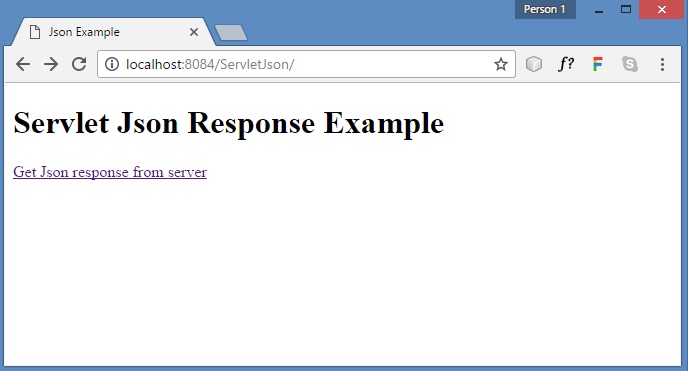
JSON Response In JSP page from Servlet
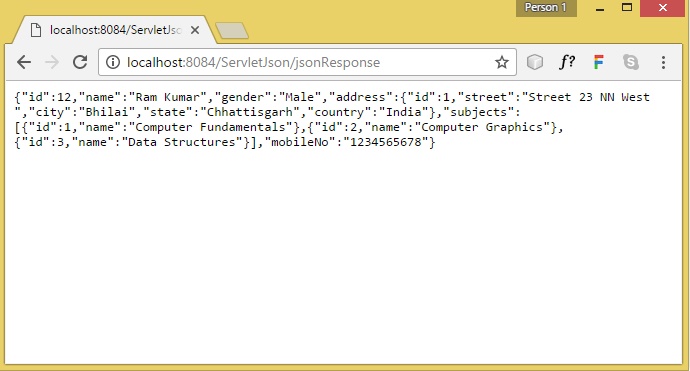
Above java servlet return JSON response.
Download above program from here