
Arrays is a kind of data structure that can store a elements of the same type.
Arrays stores the elements in a contiguous memory locations.
Array is a collection of variables of the same type.
For example: we want to declare 100 integer variable
Instead of declaring 100 individual variables, such as
int number0, number1,number2,number3, … …., number99;
you declare one integer array variable such as
int number[100];
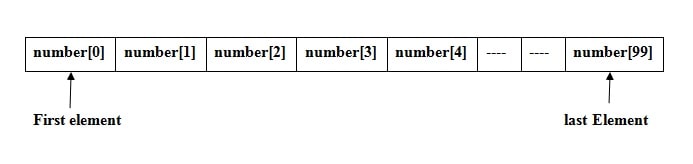
here number[100] is an integer array of size 100, means this array can store 100 integer value.
Array indexing starts from index 0 to n-1.
Means first integer number store in array number[0], second integer number store in array number[1], third integer number store in array number[2], and so on. Here 100th number store in array numbers[99].
Declaring Arrays
Syntax of declare an array in C:
Data_type arrayName [ arraySize ];
This is called a single-dimensional array.
The arraySize must be an integer constant greater than zero.
datatype can be any valid C data type.
Example: write a program to create integer array and store 5 integer number and print.
#includeusing namespace std; int main() { int num[5]; // array num can store 5 integer value num[0] = 20; // store 20 at array index 0 num[1] = 11; // store 11 at array index 1 num[2] = 20; // store 20 at array index 2 num[3] = 33; // store 33 at array index 3 num[4] = 55; // store 55 at array index 55 cout << "\n num[0] = " << num[0]; cout << "\n num[1] = " << num[1]; cout << "\n num[2] = " << num[2]; cout << "\n num[3] = " << num[3]; cout << "\n num[4] = " << num[4]; }
Output
 num[0] = 20
 num[1] = 11
 num[2] = 20
 num[3] = 33
 num[4] = 55
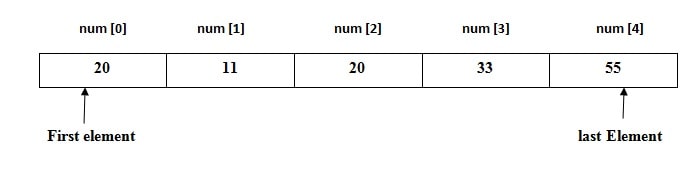
Description : In the above program, “int num[5]” array can store 5 element in a contiguous memory locations from index 0 to 4.
Example: Write a program to take 5 number from user and store integer number in integer array and print.
#includeusing namespace std; int main() { int i; int num[5]; // array num can store 5 integer value cout << "Enter 5 integer number"; for (i = 0; i < 5; i++) // for loop to take 5 integer number from user { cin >> num[i]; } cout << "\n Entered number are"; for (i = 0; i < 5; i++) // for loop to take 5 integer number from user { cout << "\n num[" << i << "] =" << num[i]; } return 0; }
Output
Enter 5 integer number
 Entered number are
 num[0] =4
 num[1] =6
 num[2] =7
 num[3] =8
 num[4] =9
Another way to Initialize Array
We can also initialize array by this way:
int num[5] = { 54 , 4, 13, 2, 17 };
above integer array num[5], stores five numbers. Where num[0] store 54, num[1] store 4….. , & num[4] store 17.
#includeusing namespace std; int main() { int i; int num[5] = { 54, 4, 13, 2, 17 }; cout << "\n Entered number are"; for (i = 0; i < 5; i++) // for loop to take 5 integer number from user { cout << "\n num[" << i << "] =" << num[i]; } return 0; }
Output
 Entered number are
 num[0] =54
 num[1] =4
 num[2] =13
 num[3] =2
 num[4] =17
Multi-dimensional Arrays
C++ programming language also support multidimensional arrays.
Syntax of multidimensional array declaration:
Data_type array_name[size1][size2]...[sizeN];
For example, if we want to creates a three dimensional integer array −
int num[5][10][4];
Two-dimensional Arrays
The simplest form of multidimensional array is the two-dimensional array.
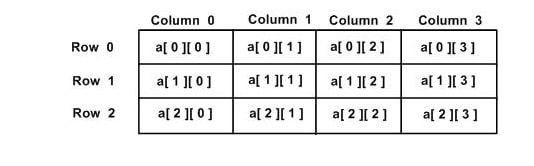
If we want to declare a two dimensional integer array of size [x][y] ( where x is a number of rows and y is a number of columns ) you would write something as follows −
int a[3][4];
In the above line we have created two-dimensional integer array ”a” with 3 rows and 4 columns.
Initializing Two-Dimensional Arrays
In a C++ programming language Multidimensional arrays may be initialized by specifying bracketed values for each row.
For example we want to create an integer array with 3 rows and each row has 4 columns.
int a[3][4] = {
   { 1, 2, 3, 4 } ,   /*  for row index 0 */
   { 5, 6, 7, 8 } ,   /*  for row index 1 */
   { 9, 10, 11, 12}   /*  for row index 2 */
};
Above the nested braces indicates the intended rows.
The following initialization is equivalent to the previous example −
int a[3][4] = {1,2,3,4,5,6,7,8,9,10,11,12};
which indicate the nested braces for intended row, are optional.
Accessing Elements of Two-Dimensional Array
Create a two-dimensional array of size 3*3 and nested loop is used to handle a two-dimensional array −
#includeusing namespace std; int main() { /* an array with 3 rows and 3 columns*/ int a[3][3] = { { 1, 2, 3 }, { 4, 5, 6 }, { 7, 8, 9 } }; int i, j; /* output each array element's value */ for (i = 0; i < 3; i++) { for (j = 0; j < 3; j++) { cout << "\n a[" << i << "][" << j << "] =" << a[i][j]; } } return 0; }
Output
a[0][0] =1
 a[0][1] =2
 a[0][2] =3
 a[1][0] =4
 a[1][1] =5
 a[1][2] =6
 a[2][0] =7
 a[2][1] =8
 a[2][2] =9
Example: Write a program to create 3*3 matrix and take all elements of matrix as an input from user and print it.
#includeusing namespace std; int main() { /* an array with 5 rows and 2 columns*/ int a[3][3]; int i, j; cout << "Enter 9 elements of 3*3 matrix in sequence"; for (i = 0; i < 3; i++) /* input each array element's value */ { for (j = 0; j < 3; j++) { cin >> a[i][j]; } } cout << "Elements of 3*3 matrix is \n"; /* output each array element's value */ for (i = 0; i < 3; i++) { for (j = 0; j < 3; j++) { cout << a[i][j]<<" "; } cout << "\n"; } return 0; }
Output
Enter 9 elements of 3*3 matrix in sequence
1
2
3
4
5
6
7
8
9
Elements of 3*3 matrix is
1       2       3
4       5       6
7       8       9
CPP Program to Addition of Two Matrix
Example: Write a program to add two matrix.
Firstly, ask from user order of matrix( number of rows and column).
Then take the elements of matrix from user as a input and print the resultant matrix
For example, if a user input order as 3,3, i.e., three rows and three columns and
First matrix
1 2 3
4 5 6
7 8 9
Second matrix:
9 8 7
6 5 4
3 2 1
then the output of the program (addition of the two matrices) is:
10 10 10
10 10 10
10 10 10
Matrix addition program in C++
#includeusing namespace std; int main() { int m, n, i, j, f[10][10], s[10][10], sum[10][10]; cout << "Enter the number of rows and columns of matrix\n"; cin >> m >> n; cout << "Enter the elements of first matrix\n"; for (i = 0; i < m; i++) { for (j = 0; j < n; j++) { cin >> f[i][j]; } } cout << "Enter the elements of second matrix\n"; for (i = 0; i < m; i++) { for (j = 0; j < n; j++) { cin >> s[i][j]; } } cout << "Sum of matrices= \n"; for (i = 0; i < m; i++) { for (j = 0; j < n; j++) { sum[i][j] = f[i][j] + s[i][j]; cout << sum[i][j]; } cout << "\n"; } return 0; }
Output
Enter the number of rows and columns of matrix
3						// enter by user
3						// enter by user
Enter the elements of first matrix
1
2
3
4
5
6
7
8
9
Enter the elements of second matrix
9
8
7
6
5
4
3
2
1
Sum of matrices=
10	10	10
10	10	10
10      10	10
Matrix multiplication in CPP
Example: Write a program to multiply two matrix. Firstly, ask from user order of matrix( number of rows and column). Then take the elements of matrix from user as a input and print the resultant matrix.
#includeusing namespace std; int main() { int m, n, p, q, i, j, k, sum = 0; int f[10][10], s[10][10], multiply[10][10]; cout << "Enter the number of rows and columns of matrix\n"; cin >> m >> n; cout << "Enter the elements of first matrix\n"; for (i = 0; i < m; i++) { for (j = 0; j < n; j++) { cin >> f[i][j]; } } cout << "Enter the number of rows and columns of matrix\n"; cin >> p >> q; if (n != p) { cout << "The matrices can't be multiplied with each other.\n"; } else { cout << "Enter elements of second matrix\n"; for (i = 0; i < p; i++) { for (j = 0; j < q; j++) { cin >> s[i][j]; } } for (i = 0; i < m; i++) { for (j = 0; j < q; j++) { for (k = 0; k < p; k++) { sum = sum + f[i][k] * s[k][j]; } multiply[i][j] = sum; sum = 0; } } cout << "Product of the matrices:\n"; for (i = 0; i < m; i++) { for (j = 0; j < q; j++) { cout << multiply[i][j]; } cout << "\n"; } } return 0; }
Enter number of rows and columns of first matrix
3
3
Enter elements of first matrix
2
2
2
2
2
2
2
2
2
Enter number of rows and columns of second matrix
3
3
Enter elements of second matrix
2
2
2
2
2
2
2
2
2
Product of the matrices:
12	12	12
12	12	12
12	12	12
Read More