

Here we will develop the Java swing login form with database connectivity.
We considered a small example with student details to log in From Java Swing and redirect to another frame after login.
Java swing login form with database connection in Netbeans
Here we have created a swing login form in java and connected that form with the MySQL database and provide all validation related to that.
Registration Form in Java | Student registration form using java swing source code
We have covered
- Login Page design using JFrame
- Validation on Login Page
- Event Handling for Login button
- Accessing Student details from MySQL database
- Matching encrypted password using jBCrypt.
To make our project functionating, we have included additional jar files mysql-connector-java jar file and jBCrypt jar file.
You can check both jar version in below Project Explorer.
Login form in java swing with source code example is developed using NetBeans IDE.
Project Explorer for this project is as below.
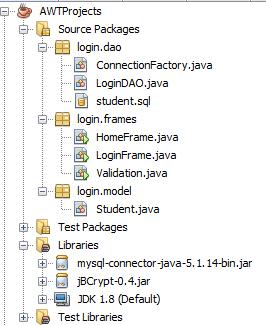
In the above Figure you can see, there is a package name login and its three sub-packages dao, frames, and model.
login.dao contains the following three files
1. ConnectionFactory.java -Used to establish a connection from the database.
2. LoginDAO.java– Extracts user details from student table from MySQL database.
3. Student.sql– It is an SQL query to create table structure. Also contains a record of a student.
login.frame package contains the following files
1 LoginFrame.java – It contains JFrame to create a login Frame.
2. HomeFrame.java – It contains JFrame to create a home Frame.
3. Validation.java – This file is used to validate userid and password field of LoginFrame
login.model this package contains a file
1 Student.java – This file contains necessary fields of students its getter setter and toString() method. This is a simple Pojo File.
Libraries contain jar files
1 jdk1.8 – Using jdk1.8 for this project
2. mysql-connector-java – Used to connect MySQL database with Java
3 JBCrypt – Used to encrypt password.
To start a new Project in NetBeans click on
File->New Project
From Category select Java and at Projects select Java Application
then click on next
then provide project Name and select Use dedicated folder for Storing libraries then click on Finish.
This will create a project.
Create a package login and inside login create three packages frames, model, and dao.
Create a Login Form in Java Frame
Create a login frame in login.frames package.
General methods inside the login frame are as below.
1 Declare component like buttons,textbox, password field, etc inside LoginFrame class
2. Create a default constructor inside this create an object for declared components.
3. Create a method setBounds() to assign positions for components
4. Add all components to Container in addComponent()
5 Method addActionListener() is created to add actionListeners() to components
6 actionPerformed() the overridden method is used to handle the event
7 main() is creating an object of class and set title, visibility, frame size, EXIT_ON_CLOSE, and resizable properties of the frame.
The following code contains the general structure of the frame
package login.frames;

import java.awt.event.ActionEvent;
import java.awt.event.ActionListener;
import javax.swing.JFrame;

public class LoginFrame extends JFrame implements ActionListener {

    /*---------1---------*/
    //declare components(button,label,textbox etc)
    /*---------2---------*/
    //create objects for components
    public LoginFrame() {
    }

    /*---------3---------*/
    //Place components at specified position
    public void setBounds() {
    }

    /*---------3---------*/
    //Add components to Container
    public void addComponents() {

    }

    /*---------4---------*/
    //Add actionListener to components
    public void addActionListener() {

    }

    /*---------5---------*/
    //Perform actions based on events
    public void actionPerformed(ActionEvent e) {

    }

    public static void main(String[] args) {
        /*Create object of class and set basic properties*/
        LoginFrame frame = new LoginFrame();
        frame.setTitle("Login Form");
        frame.setVisible(true);
        frame.setBounds(250, 250, 370, 300);
        frame.setDefaultCloseOperation(JFrame.EXIT_ON_CLOSE);
        frame.setResizable(false);

    }

}
Add Components to Login Frame
Here components JLabel, JTextField, JButton, Container are declared and their objects are created in the default constructor, bounds are assigned in setBounds() and components are added to the container in addComponent().
package login.frames;

import java.awt.*;
import java.awt.event.*;
import javax.swing.*;

public class LoginFrame extends JFrame implements ActionListener {

    JLabel userNameLable, passwordLabel;
    JTextField userNameTextField;
    JPasswordField passwordField;
    JButton loginButton;
    Container container;

    public LoginFrame() {
        userNameLable = new JLabel("User Name");
        userNameTextField = new JTextField();
        passwordLabel = new JLabel("Password");
        passwordField = new JPasswordField();
        loginButton = new JButton("Login");
        container = getContentPane();
        container.setLayout(null);
        setBounds();
        addComponents();
        addActionListener();

    }

    public void setBounds() {
        userNameLable.setBounds(10, 10, 100, 30);
        userNameTextField.setBounds(100, 10, 200, 30);
        passwordLabel.setBounds(10, 50, 100, 30);
        passwordField.setBounds(100, 50, 200, 30);
        loginButton.setBounds(100, 100, 200, 30);
    }

    public void addComponents() {
        container.add(userNameLable);
        container.add(userNameTextField);
        container.add(passwordLabel);
        container.add(passwordField);
        container.add(loginButton);
    }

    public void addActionListener() {
    }

    @Override
    public void actionPerformed(ActionEvent e) {

    }

    public static void main(String[] args) {
        LoginFrame frame = new LoginFrame();
        frame.setTitle("Login Form");
        frame.setVisible(true);
        frame.setBounds(250, 250, 370, 300);
        frame.setDefaultCloseOperation(JFrame.EXIT_ON_CLOSE);
        frame.setResizable(false);

    }

}
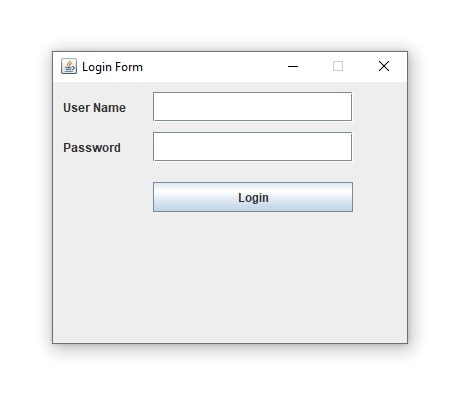
Learn basic JFrame tutorial here
Add Action Listener and perform check for correct userid and password
Added actionListener for loginButton. Action handling is performed in actionPerformed().
We are overriding actionPerformed() of ActionListener Interface.
IF any event occurs then we check its source by e.getSource() method.
Here we are comparing e.getSource() with loginButton. java button click event is handled here.
If the login button is clicked then statements inside if the statement is executed.
Inside if statement we are getting values of userNameTextField.getText() and passwordField.getText();
getText() is used to get textbox value as text.
getText() of JPassword the field is deprecated but for demo purposes, we are using it.
after getting userid and password we are matching both with our user id and password
if (userName.equalsIgnoreCase("Test") && password.equalsIgnoreCase("1234@."))
if both are matching then print logged in else unable to login.
package login.frames;

import java.awt.*;
import java.awt.event.*;
import javax.swing.*;

public class LoginFrame extends JFrame implements ActionListener {

    JLabel userNameLable, passwordLabel;
    JTextField userNameTextField;
    JPasswordField passwordField;
    JButton loginButton;
    Container container;

    public LoginFrame() {
        userNameLable = new JLabel("User Name");
        userNameTextField = new JTextField();
        passwordLabel = new JLabel("Password");
        passwordField = new JPasswordField();
        loginButton = new JButton("Login");
        container = getContentPane();
        container.setLayout(null);
        setBounds();
        addComponents();
        addActionListener();

    }

    public void setBounds() {
        userNameLable.setBounds(10, 10, 100, 30);
        userNameTextField.setBounds(100, 10, 200, 30);
        passwordLabel.setBounds(10, 50, 100, 30);
        passwordField.setBounds(100, 50, 200, 30);
        loginButton.setBounds(100, 100, 200, 30);
    }

    public void addComponents() {
        container.add(userNameLable);
        container.add(userNameTextField);
        container.add(passwordLabel);
        container.add(passwordField);
        container.add(loginButton);
    }

    public void addActionListener() {
        loginButton.addActionListener(this);
    }

    @Override
    public void actionPerformed(ActionEvent e) {
        System.out.println("Event called");
        if (e.getSource() == loginButton) {
            String userName = userNameTextField.getText();
            /*never print password or other sensitive data in console
              this is only for testing purpose*/
            String password = passwordField.getText();
            System.out.println(userName + " " + password);

            //check password provided by user with stored password in database
            if (userName.equalsIgnoreCase("Test") && password.equalsIgnoreCase("1234@.")) {
                System.out.println("Logged in");
            } else {
                System.out.println("Unable to login");
            }
        }
    }

    public static void main(String[] args) {
        LoginFrame frame = new LoginFrame();
        frame.setTitle("Login Form");
        frame.setVisible(true);
        frame.setBounds(250, 250, 370, 300);
        frame.setDefaultCloseOperation(JFrame.EXIT_ON_CLOSE);
        frame.setResizable(false);

    }

}

Login is checked with different user id and password with their output in the console as shown below.
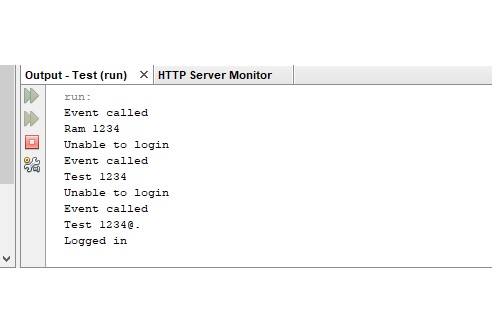
Our code is working properly.
Now we will validate the user id and password field.
Adding Validation for userid and password
For validation created a class Validation.java in login.frames the package.
For validation, we are considering the following rules
- User id and password must not be empty.
- User id and password must have minimum 4 characters
- User id and password must have maximum 20 characters
Here Done only basic validation. Not validating valid mail id.
Later or you can also use login with a mobile number or any other unique id.
According to this rule we have written the following validateLogin().
This will accept userid and password and check for the above conditions.
validateLogin() returns err ArrayList and that list is displayed in LoginFrame.
package login.frames;
package login.frames;
import java.util.ArrayList;
import java.util.List;
public class Validation {
    public List validateLogin(String uname, String password) {
        ArrayList err = new ArrayList();
        if (uname.isEmpty()) {
            err.add("User Name can not be empty");
        } else if (uname.length() < 4) {
            err.add("User Name is too short");
        } else if (uname.length() > 20) {
            err.add("user Name is too long");
        }
        if (password.isEmpty()) {
            err.add("Password can not be empty");
        } else if (password.length() < 4) {
            err.add("Password is too short");
        } else if (password.length() > 20) {
            err.add("Password is too long");
        }
        return err;
    }
}
Updating LoginFrame to add validation
Here we created object of Validation and called validateLogin().
If any error occurs then errors are displayed with
JOptionPane.showMessageDialog(null, errors.toArray());
@Override
    public void actionPerformed(ActionEvent e) {
        System.out.println("Event called");
        if (e.getSource() == loginButton) {
            String userName = userNameTextField.getText();
            /*never print password or other sensitive data in console
              this is only for testing purpose*/
            String password = passwordField.getText();
            System.out.println(userName + " " + password);
            Validation v = new Validation();
            java.util.List errors = v.validateLogin(userName, password);
            if (errors.size() > 0) {
                JOptionPane.showMessageDialog(null, errors.toArray());
                return;
            }
            //check password provided by user with stored password in database
            if (userName.equalsIgnoreCase("Test") && password.equalsIgnoreCase("1234@.")) {
                System.out.println("Logged in");
            } else {
                System.out.println("User id");
            }
        }
    }
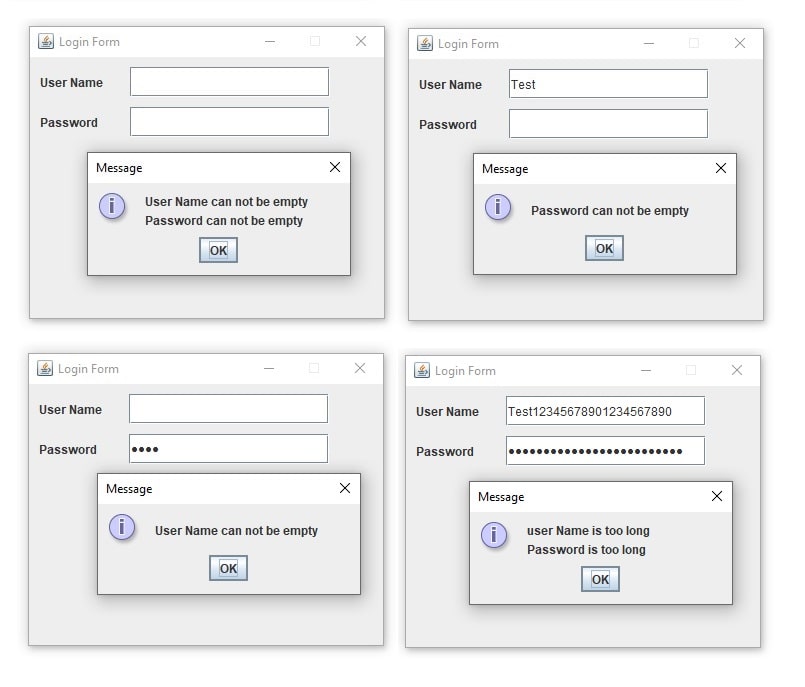
Output for LoginFrame validation is as below
Checking user id and password from MySQL database
Create MySQL database and table and insert value that is given below
CREATE TABLE student
  (
     id        BIGINT(20) UNSIGNED NOT NULL auto_increment,
     name      VARCHAR(200),
     dob       DATE,
     gender    VARCHAR(10),
     mailid    VARCHAR(100),
     mobile_no VARCHAR(12),
     password  VARCHAR(200),
     program    VARCHAR(100),
     branch    VARCHAR(100),
     semester  INT(2),
     add_date   TIMESTAMP DEFAULT CURRENT_TIMESTAMP(),
     PRIMARY KEY (id),
     UNIQUE KEY (mailid),
     UNIQUE KEY (mobile_no)
  )
engine=innodb
DEFAULT charset=utf8;
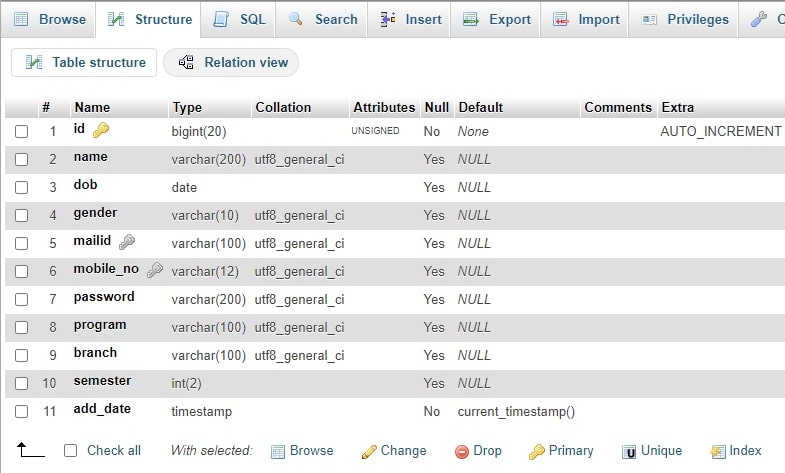
Model to Assing JDBC value to Student Object
Student.java is added in login.model
This contains basic fields of students and getter setter and toString().
The object of this class is created in LoginDAO.java to assign values that is extracted from the student table.
package login.model;

public class Student {

    long id;
    String name;
    String uname;
    String password;

    public long getId() {
        return id;
    }

    public void setId(long id) {
        this.id = id;
    }

    public String getName() {
        return name;
    }

    public void setName(String name) {
        this.name = name;
    }

    public String getUname() {
        return uname;
    }

    public void setUname(String uname) {
        this.uname = uname;
    }

    public String getPassword() {
        return password;
    }

    public void setPassword(String password) {
        this.password = password;
    }

    @Override
    public String toString() {
        return "Student{" + "id=" + id + ", name=" + name + ", uname=" + uname + ", password=" + password + '}';
    }

}
Database Connectivity :Establishing Connection with MySQL Database
ConnectionFactory.java is used to connect MySQL database with username and password and return Connection object.
Following code is how to connect MySQL database with java
package login.dao;

import java.sql.Connection;
import java.sql.DriverManager;
import java.sql.SQLException;

public class ConnectionFactory {

    public static Connection getConnection() {
        Connection c = null;
        try {
            Class.forName("com.mysql.jdbc.Driver");
            c = DriverManager.getConnection("jdbc:mysql://localhost:3306/ebhor?useUnicode=true&characterEncoding=UTF-8", "ebhor_user", "21V6");
        } catch (ClassNotFoundException e) {
            System.out.println("ClassNotFoundException " + e);
        } catch (SQLException e) {
            System.out.println("SQLException " + e);
        }
        return c;
    }
}
Accessing Student details from MySQL Database
Following JDBC program (LoginDAO.java) is used to get student details from the database.
For this, we used PreparedStatement of JDBC.
Here we fetch data from the database in java and assigned it to the student object.
Here we checked user detail with mail id, you can use a mobile number or with both.
package login.dao;

import ebhor.model.Student;
import java.sql.Connection;
import java.sql.PreparedStatement;
import java.sql.ResultSet;
import java.sql.SQLException;


public class LoginDAO {

    Connection con = null;
    PreparedStatement ps = null;
    ResultSet rs = null;
    int st;//status

    public Student checkLogin(String uname) {
        Student student = new Student();
        con = ConnectionFactory.getConnection();
        try {
            String query = "select * from student where mailid=?";
            ps = con.prepareStatement(query);
            ps.setString(1, uname);
            rs = ps.executeQuery();
            while (rs.next()) {
                student.setId(rs.getLong("id"));
                student.setName(rs.getString("name"));
                student.setMailId(rs.getString("mailid"));
                student.setPassword(rs.getString("password"));
            }
        } catch (Exception e) {
            e.printStackTrace();
        } finally {
            try {
                con.close();
            } catch (SQLException ex) {
                ex.printStackTrace();
            }
        }
        return student;
    }
}
Comparing user id and password from DAO in LoginFrame.java
- Create object for LoginDAO
- call checkLogin(userName) to check whether user exists or not.
- If user exists then student.getId() will not be zero.
- Compare user password with database stored password using BCrypt.
- If userid and password is correct then show HomeFrame
- else show appropriate message
Complete Code for HomeFrame.java is
.........
LoginDAO dao = new LoginDAO();
            Student student = dao.checkLogin(userName);
            //Check where student exists in database or not
            System.out.println(student);
            //If Student object is not availabe in database the id=0
            if (student.getId() == 0) {
                System.out.println("No user found with username");
                return;
            }
            //check password provided by user with stored password in database
            if (BCrypt.checkpw(password, student.getPassword())) {
                System.out.println("Logged in");
                new HomeFrame().setVisible(true);
                this.dispose();
            } else {
                System.out.println("Unable to login");
                JOptionPane.showMessageDialog(null, "User id or password is incorrect");
                return;
            }
Showing HomeFrame after Successful Login
In LoginFrame.java if userid and password are correct then we added setVisible(true) for HomeFrame and dispose of () the LoginFrame as below
new HomeFrame().setVisible(true);
this.dispose();
HomeFrame.java is created to login.frames this frame is shown after successful login.
package login.frames;

import java.awt.Container;
import javax.swing.JFrame;
import javax.swing.JLabel;

public class HomeFrame extends JFrame {

    JLabel message;
    Container container = getContentPane();

    public HomeFrame() {
        message = new JLabel("You are successfully logged in");
        container.setLayout(null);
        this.setTitle("Home Form");
        this.setVisible(true);
        this.setBounds(250, 250, 370, 300);
        this.setDefaultCloseOperation(JFrame.EXIT_ON_CLOSE);
        this.setResizable(false);
        setBounds();
        addComponents();
    }

    public void setBounds() {
        message.setBounds(10, 10, 400, 30);

    }

    public void addComponents() {
        container.add(message);

    }

}
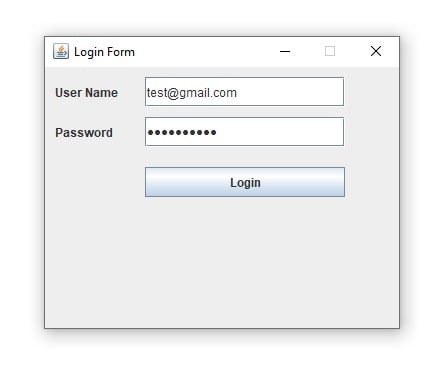
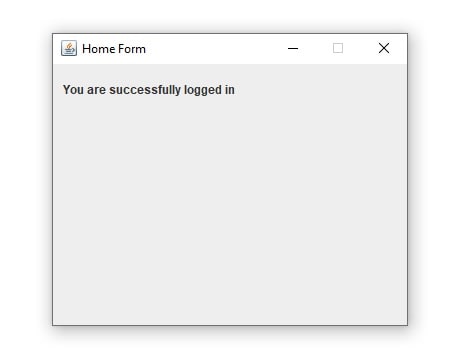
Login form in java swing with source code. Download The Complete Project with Source code
Java swing login form with MySQL database connection source code download
Hope you understand Java swing login form with database connection.